Site Health
Link a project to the client's website. Taskift checks it every 5 minutes, reads the SSL certificate, domain renewal and DNS records, and opens a task on the board when something breaks.
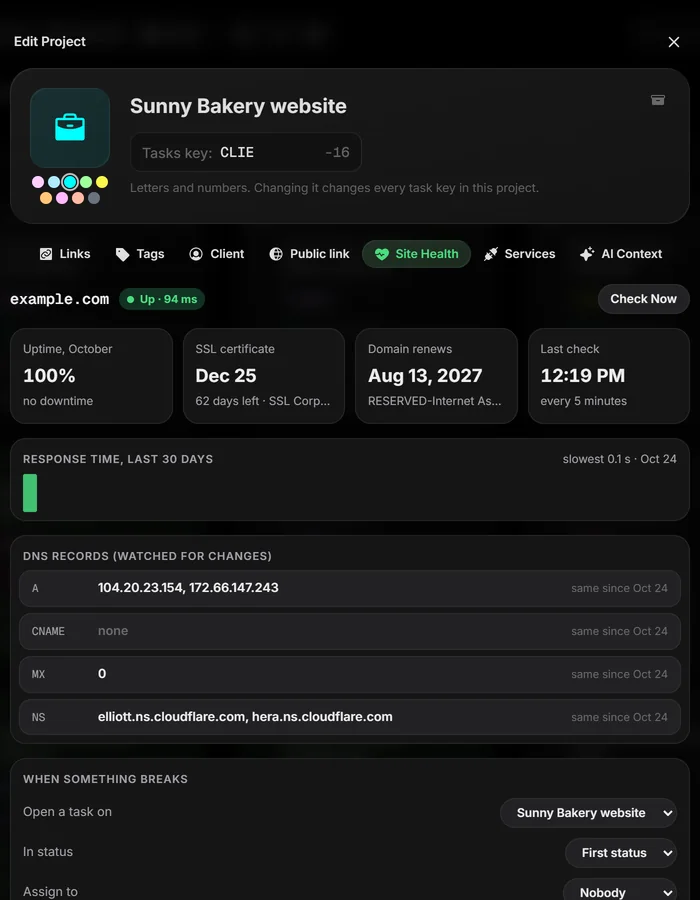
01Start watching a site#
- Open the project's menu on the board and pick Edit Project.
- Open the Site Health tab.
- Type the client's domain, like
sunnybakery.com, and click Start Watching.
The first check runs right away. You can paste a full address; Taskift keeps just the domain.
02What Taskift checks#
- Uptime: every 5 minutes. One failed check isn't "down"; two in a row is.
- SSL certificate: twice a day. You're warned when it has less than 14 days left.
- Domain renewal: twice a day, from the registry. You're warned when it has less than 30 days left.
- DNS records: A, CNAME, MX and NS, every hour. Any change is flagged, so a moved website or broken email doesn't go unnoticed.
The tab also shows this month's uptime, the response time for the last 30 days and when each DNS record last changed.
03When something breaks#
A problem opens one task, labeled Site Health, on the project you pick under When something breaks. You can choose its status and who it's assigned to. When the check passes again, the task moves to the project's done status. Switch off Close the task when the check passes again if you'd rather close it yourself.
04Badges on the board#
A watched project shows a small badge in its header: green when the site is up, and a warning when it's down, an SSL certificate or domain is running out, or DNS changed. The Dashboard lists every watched site, worst first.
05One site free, 25 with the add-on#
Every workspace watches 1 site free. The Site Health add-on watches up to 25 sites for $9 a month ($108 a year on an annual plan). During the free trial you can watch up to 25 sites without it.
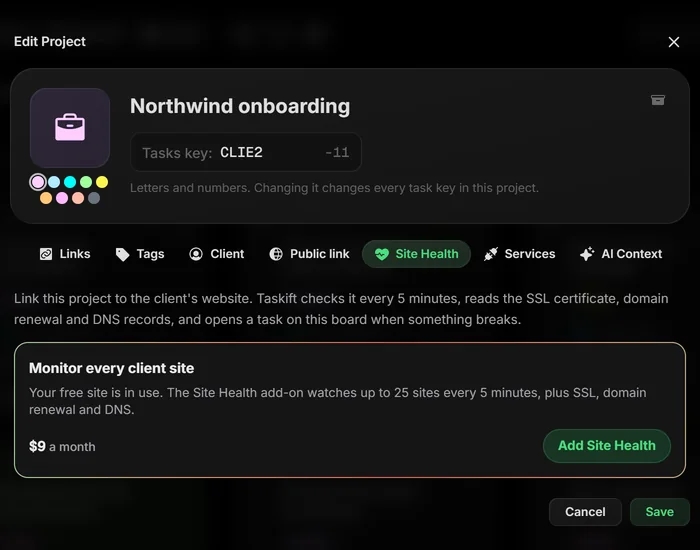
If the add-on ends, your first site keeps being checked and the others pause, with a notice on each. Nothing is deleted, and the checks pick up again as soon as the add-on is back.