Edit a task
Click any card to open the task. Everything about it sits in one place: status, tags, priority, dates, the person on it, checklist, subtasks, dependencies, description and comments.
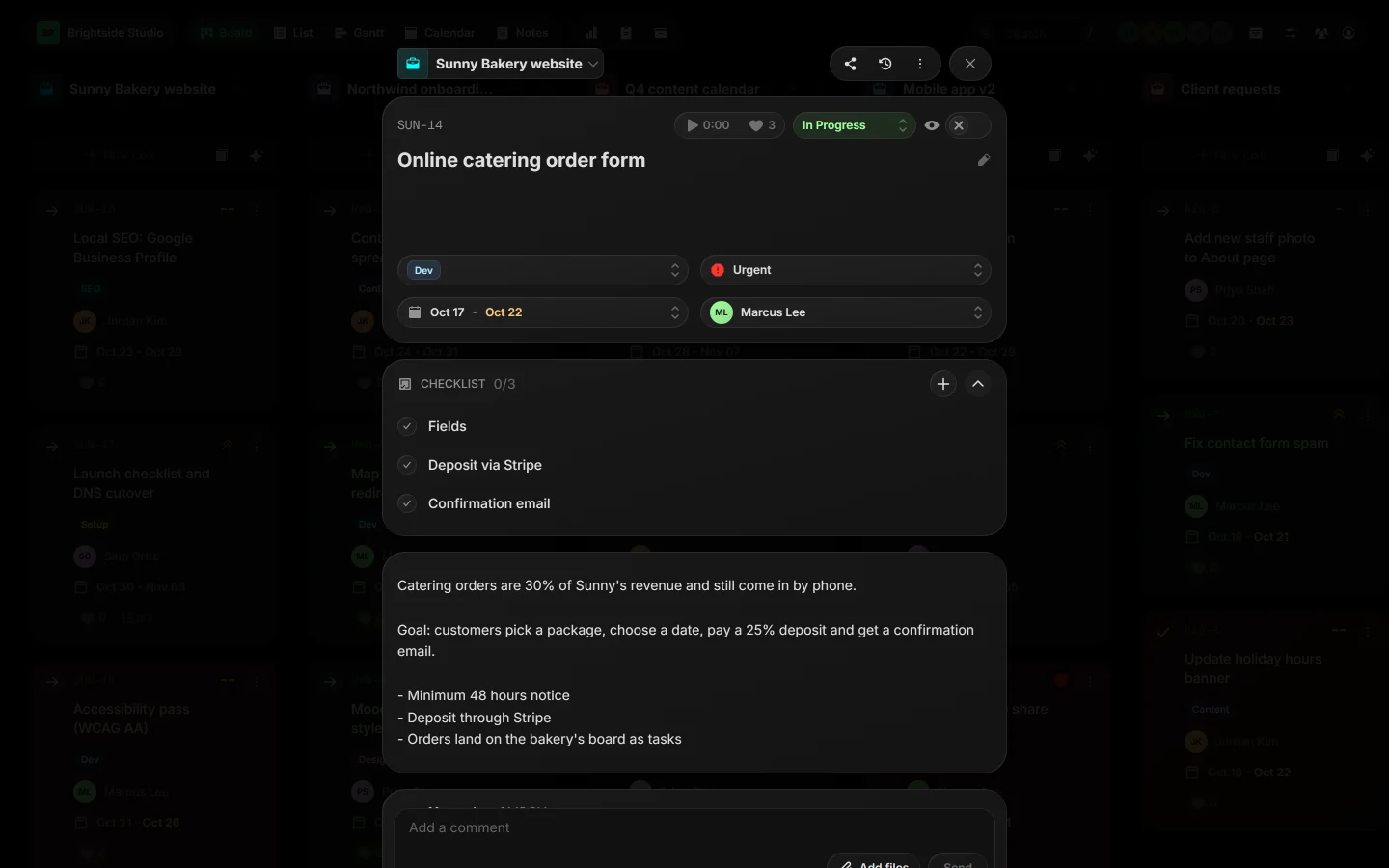
01The top row#
- Task key, like
SUN-14, on the left. - A timer and a like count. See Time tracking.
- The status. Click it to pick another.
- The eye button: Client can see this task. Turn it on for tasks your client should see.
 Close-up
02Properties#
Under the title: tags, priority, dates (start and due) and the assigned person. Click any of them to change it.
Close-up03Checklist, subtasks and more#
| Checklist | Quick to-dos inside the task. Type an item and press Enter. |
| Subtasks | Full tasks under this one. See Subtasks. |
| Dependencies | What this task waits on, and what waits on it. See Dependencies. |
| Description | The details: what done looks like, links, notes. |
| Comments | The conversation about the task, with files. |
04The More menu#
Click ⋮ in the task's header, or press ., for everything else: subtasks, dependencies, milestones, copy the link or key, export, reminders, duplicate, save as template, move and archive. Most items have a number key.
 Close-up
05Task shortcuts#
X moves the task to Done, S adds a subtask, D adds a dependency and M jumps to the comment box.
Related guides
Was this page helpful?