Invite your team
Teammates join from the Team page. Owners and admins can invite people, change roles and remove members.
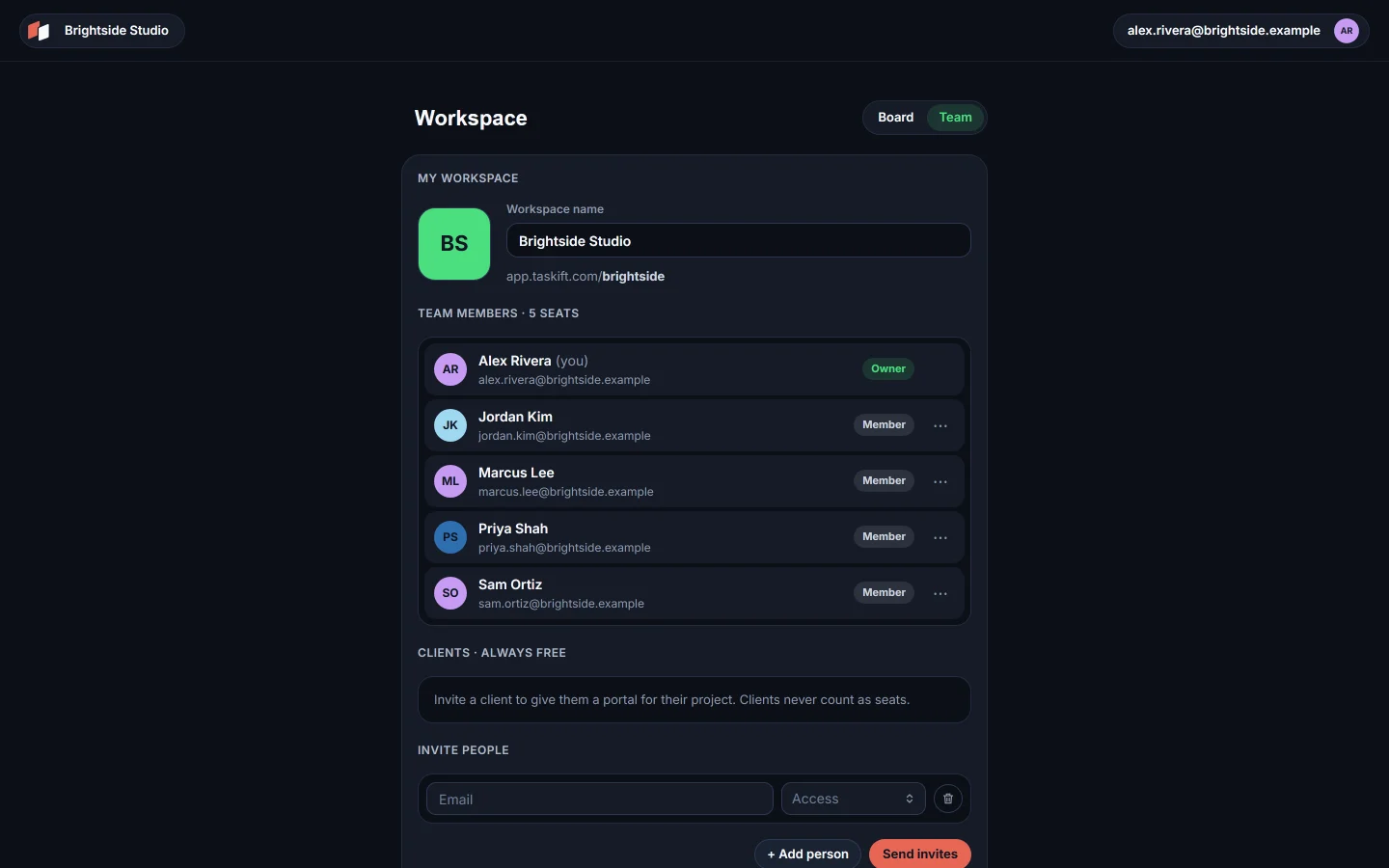
01Send an invite#
- Open the Team page from the people icon in the top bar.
- Under Invite people, type the person's email address.
- Open Access and pick a role.
 Close-up
FIG 2Member, Admin or Client. - Inviting more than one person? Click + Add person for another row. Then click Send invites.
| Member | Works on all boards. |
| Admin | Everything a member can do, and also manages people and agents. |
| Client | Free, and sees only their projects. See Invite a client. |
Each person gets an email that says who invited them and in which role. They click Accept invite, or sign in first if they are new to Taskift.
02Seats#
The Team page shows how many seats your workspace uses. Owners, admins and members each use one. Clients and AI agents never count as seats.
03Change a role#
Use the ··· menu at the end of a member's row.
Close-up- Make admin or Make member switches their role.
- Make owner hands over ownership. Only the owner sees it.
- Remove from workspace takes them out.
Anyone except the owner can also Leave workspace from their own row.
Good to know AI agents are added further down the same page and get their own API tokens. See AI agents and tokens.
Related guides
Was this page helpful?